How to Create a 3x3 Instagram Grid Layout (Split Photos Seamlessly)
Turn your profile into an immersive digital portfolio. Learn how to slice wide images into a cohesive 3x3 or 3x1 Instagram grid layout and post them in the exact order.
Published by HD Reels Downloader. Suggest a correction.
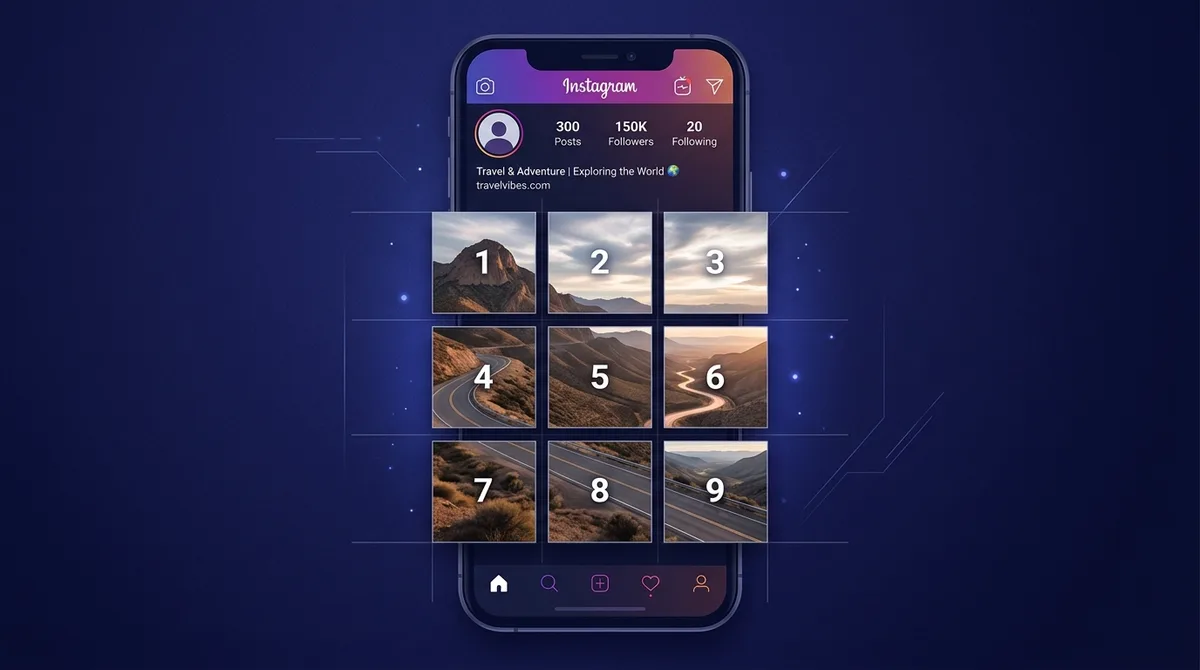
The Anatomy of an Instagram Profile Grid Banner
Your Instagram profile grid is your digital storefront. While individual feed posts generate momentary reach, profile visits are where casual viewers convert into long-term followers and customers.
A 3x3 grid layout (splitting one giant photograph or banner into 9 square tiles) creates an arresting, cohesive visual experience. It instantly conveys high production value, making it especially popular for album drops, product launches, architecture showcases, and travel panoramas.
Grid Mathematics: 3x1, 3x2, and 3x3 Aspect Ratios
Instagram displays profile feeds in three equal columns of square tiles (1:1 ratio, 1080×1080 pixels each). Slicing an image requires specific dimensions to avoid distortion:
- 3x1 Horizontal Banner: Requires an ultra-wide 3:1 ratio (3240 × 1080 pixels), perfect for landscape panoramas spanning an entire row.
- 3x2 Grid (6 Tiles): Requires a 3:2 ratio (3240 × 2160 pixels), ideal for rectangular editorial portraits.
- 3x3 Full Grid (9 Tiles): Requires a perfect square canvas (3240 × 3240 pixels), splitting into 9 equal 1080×1080 tiles that fill the viewer's entire mobile viewport.
The Reverse Posting Rule: How to Avoid Messing Up the Order
The single most common mistake creators make when publishing a grid banner is uploading images in the wrong sequence. Instagram places newly published posts in the top-left slot, pushing previous posts to the right and down.
To assemble your 3x3 grid correctly, you must upload in reverse order:
- Upload tile #9 (bottom-right) first.
- Follow in reverse sequence: #8, #7, #6, #5, #4, #3, #2.
- Upload tile #1 (top-left) last.
When you finish, your profile displays the complete, unified photograph right side up.
The Shifting Problem: What Happens When You Post Later
Every time you publish a new single post in the future, your entire grid shifts one position to the right, misaligning a 3x3 grid into disjointed fragments. Creators manage this with three proven strategies:
- The Row of 3 Rule: Always publish new content in batches of three (or post your main photo flanked by two complementary textures/quotes).
- The Pinned Posts Trick: Use Instagram's "Pin to your profile" feature to anchor key announcements above the grid.
- Puzzle Feeds: Design individual tiles with independent borders or aesthetic backgrounds so they look attractive even when slightly offset.
Step-by-Step: Slicing Photos in High Resolution Without Any App
You don’t need Photoshop or ad-ridden phone apps to slice your images:
- Open our free Instagram Grid Maker at hdreelsdownloader.net/instagram-grid-maker.
- Drag and drop your high-resolution image into the tool.
- Choose your desired grid layout: 3x1, 3x2, or 3x3.
- Use the interactive pan and zoom controls to position your focal subject.
- Click "Download All Tiles (ZIP)" to receive numbered tiles (tile_01 to tile_09) in full 1080×1080 resolution, accompanied by a visual reverse posting guide.
Captions and Value: Making Each Individual Tile Engaging
Remember that your followers will first encounter each individual tile in their chronological home feeds. An empty tile showing just a patch of sky or pavement can feel like spam without context.
Give every tile an engaging caption: share behind-the-scenes stories, numbered tips, or teaser quotes, and add a note inviting followers to "Visit profile to see the full panorama". This preserves feed engagement while driving high traffic back to your profile page.
References
Frequently asked questions
In what order should I upload the 9 split images to Instagram?
Upload in reverse order: start with tile #9 (bottom-right) and finish with tile #1 (top-left). This ensures the tiles align perfectly on your profile grid.
Will posting a single new picture break my 3x3 grid layout?
Yes. Posting a single new photo shifts the grid by one tile. To prevent misalignment, always publish in batches of 3 or use row banners.
Does slicing an image reduce its photo quality?
The Grid Maker exports 1080 × 1080 JPEG tiles. JPEG encoding uses lossy compression, and scaling can affect detail. Keep your source image.
More from the journal
Read more tutorials and practical tips for saving social media.