Instagram Reels & TikTok Safe Zone: How to Stop UI From Cropping Text
Nothing ruins high-effort Reels faster than buttons and captions covering critical text. Master vertical 9:16 safe zone boundaries across Instagram, TikTok, and YouTube Shorts.
Published by HD Reels Downloader. Suggest a correction.
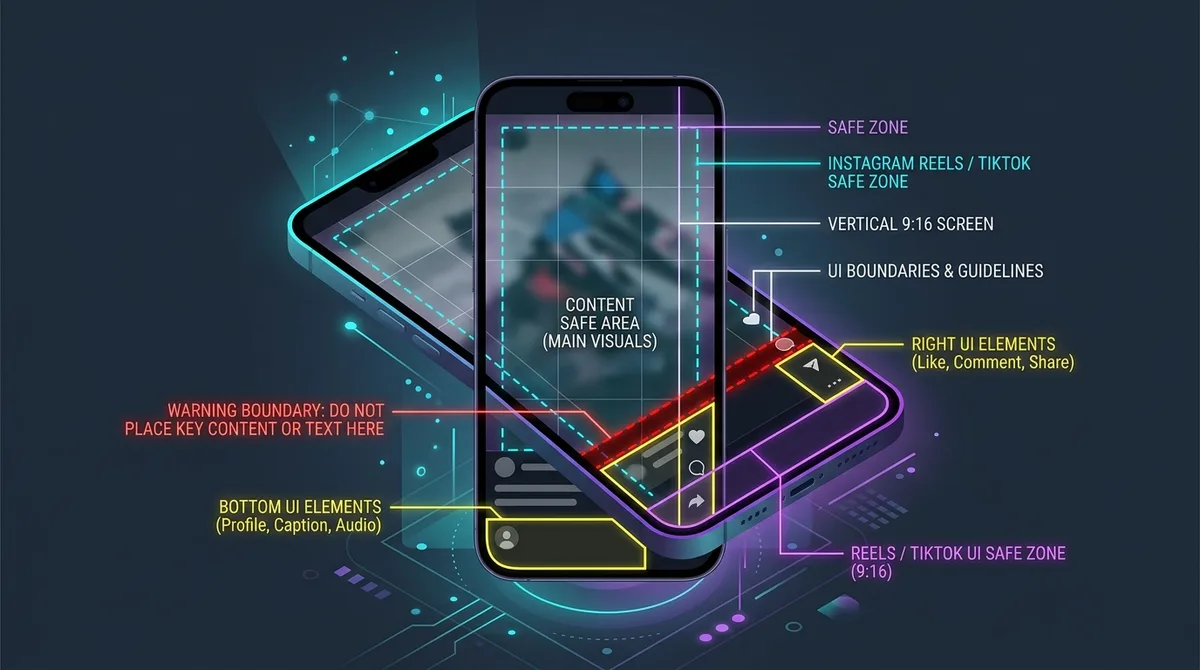
Why Social Media UI Overlays Ruin Great Content
Creating high-performing vertical video requires more than good lighting and sharp editing. When an Instagram Reel, TikTok video, or YouTube Short is played on mobile, the platform superimposes native interface elements directly over your footage.
These include the creator's username, follow button, multi-line caption, audio spinning disk, like/comment/share icons on the right margin, and top status bars. Together, these interface elements cover up to 35% of the total 1080×1920 video area.
The Exact Safe Zone Dimensions for 1080×1920 Vertical Video
For a 1080×1920 canvas, the following are example editing margins rather than official or universal safe zones. Check the final post because caption length and device layouts vary:
- Top Margin: Keep key visual content at least 220 pixels below the top edge to clear the search bar, sound ticker, and front camera notch.
- Bottom Margin: Keep subtitles and text at least 380 pixels above the bottom edge to clear captions, username tags, and audio titles.
- Right Margin: Leave a 120-pixel safe margin along the right side so action buttons (heart, comment, bookmark, share) do not obstruct your visuals.
Differences Between Instagram Reels, TikTok, and YouTube Shorts
While all three platforms use full-screen 9:16 vertical video, their interface placements differ:
- Instagram Reels: Features a prominent bottom-left caption box and right-side engagement column.
- TikTok: Has longer expandable captions that take up more bottom space, plus a spinning audio vinyl in the lower right.
- YouTube Shorts: Displays a distinctive red Subscribe button and prominent title text in the lower third.
These overlays are approximate. Check the final upload in each app because interfaces vary by device and version.
The Feed Preview Crop: Why 4:5 and 1:1 Thumbnails Matter
In addition to full-screen 9:16 playback, your video must survive two additional crops on Instagram:
- Home Feed Crop (4:5 Ratio · 1080×1350 px): When users see your Reel in their standard feed, the top and bottom 285 pixels are clipped.
- Profile Grid Crop (1:1 Ratio · 1080×1080 px): In your profile tab, only the exact central square is displayed.
Always position your focal hook and title text within the central 1080×1080 square so your content looks intentional in every view mode.
Subtitles and Caption Placement Best Practices
Over 70% of social media users browse with audio muted in public spaces. Adding subtitles is non-negotiable for retention, but placing them too low leads to immediate frustration when the app caption covers your words.
Center your animated captions around 40% to 55% from the bottom of the screen. This positioning places them directly in the natural eye line of scrolling viewers while staying completely clear of bottom interface elements.
How to Test Your Videos Before Publishing with the Safe Zone Checker
Never guess whether your text will be covered. Use our interactive Reels Safe Zone Checker at hdreelsdownloader.net/reels-safe-zone-checker:
- Drag and drop your video (MP4) or static graphic (PNG/JPG) into the checker.
- Toggle between Instagram Reels, TikTok, and YouTube Shorts UI presets.
- Switch on the 4:5 and 1:1 grid overlay guides to check your thumbnail framing.
- Play your video in real-time to verify that every subtitle and visual hook stays completely legible before you hit publish.
References
Frequently asked questions
What are the exact pixel dimensions of the Instagram Reels safe zone?
On a standard 1080×1920 video, the primary safe zone begins 220px from the top, 380px from the bottom, and 120px from the right edge. Keep all critical text inside this box.
Why is my text getting cropped when viewing my Reel in the Instagram profile grid?
The profile grid crops vertical 9:16 videos into a 1:1 square. If your text is outside the central 1080×1080 pixel box, it will be cropped out on your profile tab.
Does the same safe zone template work for TikTok and YouTube Shorts?
While similar, TikTok has slightly larger bottom captions and YouTube Shorts features a prominent subscribe button. Our tool lets you toggle all three overlays to verify clearance across all platforms.
More from the journal
Read more tutorials and practical tips for saving social media.